
Create a Telegram Mini App and Register It in BotFather
· 4 min read · 18+ readers

A Mini App is a website that  Telegram opens inside the app and that can talk to Telegram through a JavaScript object. This tutorial builds the smallest possible one and registers it in BotFather. For the concept, read what are Telegram Mini Apps; for ideas, read Mini Apps for creators. Check core.telegram.org/bots/webapps for the current API, because new features arrive regularly.
What you need
- A bot made in BotFather. See creating a bot.
- A web page served over HTTPS. Plain HTTP will not work for production.
- A place to host static files or a small server.
Step 1: A minimal page
Create index.html:
<!doctype html>
<html lang="en">
<head>
  <meta charset="utf-8">
  <meta name="viewport" content="width=device-width, initial-scale=1, viewport-fit=cover">
  <title>My Mini App</title>
  <script src="https://telegram.org/js/telegram-web-app.js"></script>
</head>
<body>
  <h1 id="hello">Hello</h1>
  <script>
    const tg = window.Telegram.WebApp;
    tg.ready();    // tells Telegram the page has loaded
    tg.expand();   // use the full height
    const u = tg.initDataUnsafe.user;
    document.getElementById("hello").textContent = u ? "Hello, " + u.first_name : "Open me inside Telegram";
  </script>
</body>
</html>
initDataUnsafe is convenient for display, but it is not proof of identity. Anything that matters, such as logging someone in, must use initData validated on your server. See initData validation.
Step 2: Host it on HTTPS
Upload the page to any static host or your own server, and make sure it opens at an https:// address in a normal browser. Use a valid certificate. Note the address, for example https://app.example.com/.
Step 3: Register it
You have two main ways. Menu names change, so follow BotFather's current prompts.
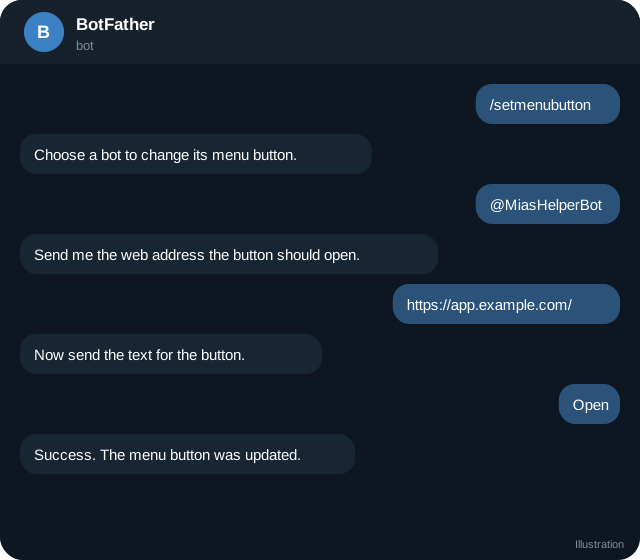
Option A, menu button. Send /setmenubutton to BotFather, choose your bot, send the URL and a button label. The button next to the message box then opens your page.
Option B, a Mini App with a direct link. Send /newapp, choose the bot, then give a title, a short description, a photo and an optional demo GIF, the web address and a short name. BotFather returns a link of the form https://t.me/yourbot/shortname. Anyone who opens it launches the Mini App.
Bots can also launch a Mini App from a keyboard or inline button. In an inline keyboard, use a web_app button:
{ "inline_keyboard": [[ { "text": "Open app", "web_app": { "url": "https://app.example.com/" } } ]] }See menu button, direct link and startapp for more.
Step 4: Theme and layout
Telegram exposes colours through tg.themeParams and CSS variables such as --tg-theme-bg-color. Use them so your app matches light and dark mode:
body { background: var(--tg-theme-bg-color, #fff); color: var(--tg-theme-text-color, #111); }Account for phone notches with viewport-fit=cover and safe area insets. Keep tap targets large.
Step 5: Useful objects
tg.MainButton: a big button at the bottom, withsetText,show,onClick.tg.BackButton: for navigation.tg.HapticFeedback: small vibrations.tg.openLink(url)andtg.openTelegramLink(url): open external pages or t.me links.tg.openInvoice(url, callback): pay an invoice link. See Stars payments.tg.close().
Check which methods exist in the user's Telegram version with tg.isVersionAtLeast("7.0").
Step 6: Talk to your server
Send tg.initData (a string) to your backend in a header, and validate it there before you trust it. Never send your bot token to the browser.
Test it
Open the Mini App on your phone, desktop and Telegram Web. Try dark mode, a small screen and a slow connection. See testing with a second account.
Common problems
- Blank page in Telegram: the URL must be HTTPS and reachable. Check mixed content.
Telegram.WebAppis undefined: the script did not load, or you opened the page outside Telegram.- User is null: the page was opened without Telegram data, for example directly in a browser.
- Old version cached: add cache busting to the URL when testing.
Quick checklist
- Page served over HTTPS and opens in a normal browser.
- telegram-web-app.js included and tg.ready() called.
- Menu button or /newapp registered in BotFather.
- Theme colours and safe areas respected.
- Identity validated on the server from tg.initData.
- Bot token kept off the front end.
- Tested on phone, desktop and Telegram Web.
- A way to reach support from inside the app.
Grow in small steps
Start with one screen and one action. When people use it, add navigation, a Back button and a main button for the primary action. Measure load time on a slow connection, because a Mini App that takes several seconds to open feels broken in a chat app.
Frequently asked questions
Do I need a framework?
No. React, Vue, Svelte or plain HTML all work. Choose what you know.
Can a Mini App work without a bot?
It is always attached to a bot.
Is there a size limit?
Keep it light. Slow pages feel broken inside a chat app.
Can I sell things inside it?
Digital goods can be sold with Stars, subject to Telegram's rules and review.
Related guides
Mini App Menu Button, Direct Links and the startapp Parameter
Launch a Telegram Mini App from the menu button, inline buttons, direct t.me links and attachment menu, and pass data with startapp. Includes link formats.
Validate Telegram Mini App initData on Your Server
Why initData must be verified, how the HMAC check works step by step, a Node.js example, auth_date freshness and common mistakes.
BotFather Commands: What Each One Does
A reference to BotFather, Telegram's tool for creating and managing bots: the main commands, settings menus, what they change and what to watch out for.
Telegram Mini Apps for Creators: What They Can Do
How creators can use Telegram Mini Apps: link pages, shops, member areas, games and tools. Includes launch options, Stars, design and safety tips.
What Are Telegram Mini Apps and How to Use Them
Telegram Mini Apps are web apps that run inside Telegram. Learn what they are, how to open one, what they are used for and how to find the good ones.
A Telegram Webhook on AWS Lambda or a Small Server
Two ways to receive Telegram updates: an AWS Lambda function URL and a tiny Node server behind HTTPS, with secret token checks, fast replies and queues.
More in Build on Telegram
- Add a Bot as Channel Admin and Post to Your Channel
- Bot Privacy Mode and Group Admin Rights Explained
- Common Telegram Bot Errors and How to Fix Them
- Connect a Bot to Your Telegram Business Account (Chatbot Mode)
All topics: Build on Telegram · Guide index · Explore Telegram · About TSocial