
A White Label Creator Link and Mini App on Telegram, Under Your Brand
· 4 min read · 18+ readers

Creators who sell subscriptions on sites such as  OnlyFans often use a link page to send followers to the right place. Agencies that manage many creators sometimes want the same thing under their own name: one branded page per creator, a clear button to chat on
 Telegram and a few well chosen links. This guide explains how a white label version of that works, what belongs on it, and how to keep it safe for work and within the rules. It is for adults 18+ and promises no results.
What the page is for
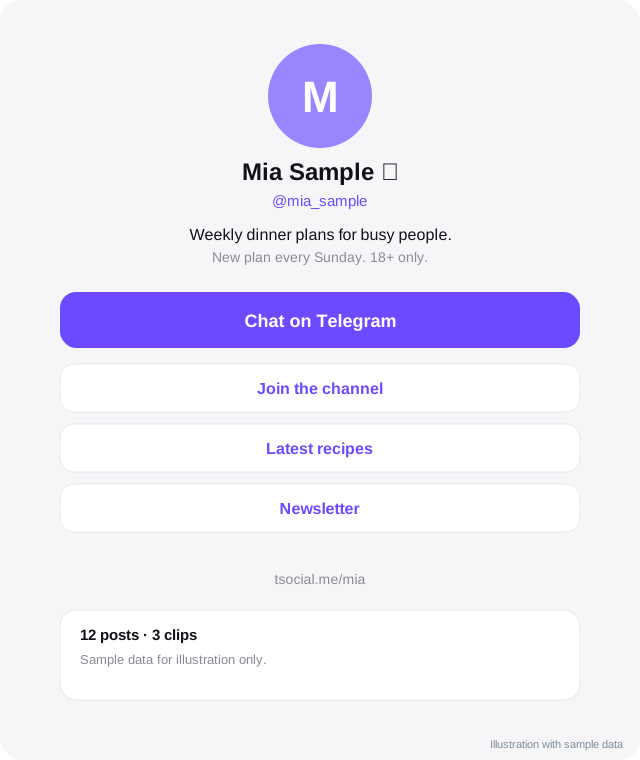
A creator link and Mini App page is a small, fast landing page that answers three questions in a few seconds: who is this, what can I do here and what do I tap next. For a creator who also has a subscription page, it typically does these jobs:
- Introduces the creator with a photo, a short bio and an 18+ note.
- Offers one main button, such as "Chat on Telegram" or "Join the channel".
- Lists a few secondary links, for example the subscription page, a shop or a newsletter.
- Optionally opens inside Telegram as a Mini App, so fans stay in the app they already use.
It is a front door, not the content itself.
Why agencies want it white label
- Consistency. Every creator page looks like part of your family of creators, with your logo and colours.
- Control. You decide the rules, the wording and what is allowed on public pages.
- Ownership of the audience path. Links, tracking and the bot belong to you and the creator, not to a third party.
- Trust. Fans see one clear brand rather than a mix of generic link tools.
- Safety. You can keep public pages within the rules of Telegram, search engines and advertising platforms.
What a good creator page contains
- Name and photo that match the creator's other accounts.
- One line about what they do or share.
- A big chat or follow button that opens Telegram. Deep links such as
t.me/botname?start=sourcelet you see where a visit came from. - Two to four secondary links. More than that reduces clicks.
- An 18+ line where the offer is for adults, and no explicit wording or images on the public page.
- A short privacy note, so visitors know what you collect.
- A report link for abuse.
See link in bio tools for what makes link pages work.
How it fits the funnel
A common flow is: a social post, then the creator's page, then a Telegram channel or chat, then a conversation, then whichever paid offer the creator chooses on the platform they use. The page is the second step. Read the step by step funnel to see how each step affects the next.
Be honest about where content lives. Do not send people to a page that implies something it does not deliver, and read the terms of each platform you link to, because rules about promotion differ.
Optional features to consider
- Telegram Stars for small digital items or channel subscriptions. See Stars for creators.
- A bot that greets new people and answers common questions. See bots for creators.
- Click statistics per source and per link.
- A creator dashboard where each creator edits their own page within limits you set.
- Verification badges for creators you have confirmed are real.
Start with the page and the chat button. Add the rest as needs appear.
Safety, privacy and rules
- Keep every public page safe for work. Adult-oriented material belongs only where each platform's rules allow it.
- Verify that each creator is an adult and that the account is theirs. Keep records as the law in your country requires.
- Collect as little data as possible, and explain what you keep.
- Give creators a way to remove their page and data.
- Protect creators from impersonation by listing official links only on the verified page. See spotting scams and impersonators.
What to test before launch
- Open the page on an old phone and a new one, in light and dark mode.
- Tap every button from inside Telegram and from a normal browser.
- Check page speed on mobile data.
- Ask someone who does not know the creator what they think they should do.
- Make sure the report button reaches a real person.
Talk to us
If you want a branded creator link and Mini App for your agency or for a larger creator, we can talk through scope, branding and who owns what. contact us with a short note about your creators and what you want the page to do.
Frequently asked questions
Is this the same as a Linktree style page?
It does a similar job, but it can open inside Telegram, connect to a bot and carry your own branding and domain.
Can fans pay inside it?
Digital items can be sold with Telegram Stars where Telegram allows it. Subscriptions on other platforms are paid on those platforms. Check each platform's rules.
Does it replace a subscription platform?
No. It is a front door that helps people find the right place and talk to the creator.
Can each creator edit their own page?
Yes, if you build a creator area with the permissions you choose. Decide in advance what they may change.
Related guides
White Label Telegram Mini App for Creators and a Directory of Your Own
What a white label Telegram Mini App and creator directory is, who it suits, what you can brand, what to plan and how a build usually goes.
Link in Bio Tools for Telegram Creators
What a link in bio page is, what to put on it, how to choose between tools, track clicks and keep your Telegram link front and centre.
From Social Post to Subscriber: A Telegram Funnel Step by Step
A simple creator funnel using Telegram: social post, link page, channel, welcome message, conversation and offer. Includes what to measure at each step.
Telegram Stars for Creators: The Complete Guide
How creators use Telegram Stars: what they are, ways to earn with bots, paid media and subscriptions, fees to check, payouts and mistakes to avoid.
Branding and Domains for Your Own Telegram Mini App
How to brand a Telegram Mini App and bot: names, usernames, logo, colours, themes, your own domain, HTTPS, email and search visibility, with a checklist.
What to Ask a White Label Telegram Mini App Vendor
A buyer's checklist for agencies and creators hiring a white label Telegram Mini App provider: ownership, data, rules, support, costs, exit and red flags.
All topics: White label Mini Apps · Guide index · Explore Telegram · About TSocial