
Telegram Bots for Creators: 8 Useful Jobs a Bot Can Do
· 4 min read · 18+ readers

A bot is not a gimmick. Used well, it takes repetitive work off your plate and gives fans quick answers. This guide lists eight practical jobs a bot can do for creators, what each needs and where bots go wrong. For the basics of how bots operate, start with how chat bots and auto-reply work. Adults 18+; examples are safe for work.
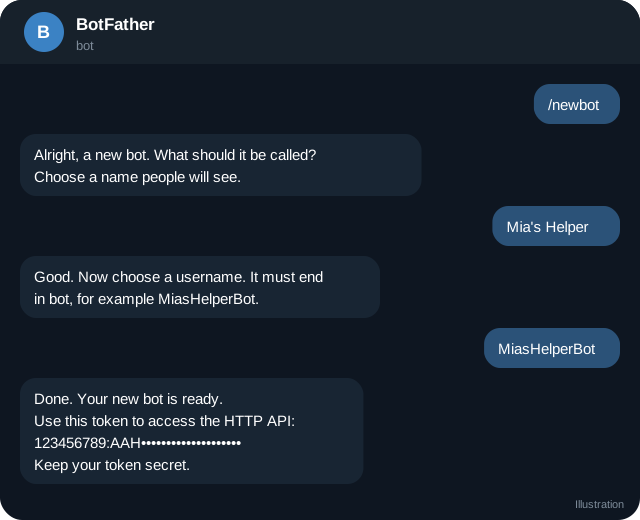
1. Welcome and menu
When someone presses Start, the bot greets them and shows buttons such as About, Links, Contact and Latest. It replaces repetitive "where can I find you?" messages. See bot commands, menus and onboarding.
2. FAQ answers
Store answers to the questions you get most. A rule-based FAQ bot is reliable and free of surprises. Add a "Talk to a person" button for anything it cannot answer.
3. Link delivery
A bot can send the right link on request: your channel, your shop, your newest post. It can also track which link buttons get pressed, which helps you learn what people want.
4. Collecting information
A short form inside a chat can gather sign-ups, feedback or requests. Ask only for what you need and tell people how you will use it. Do not collect sensitive personal data.
5. Polls, quizzes and community prompts
A bot can post weekly questions, run quizzes and remind members of events.  Telegram also has built-in polls, so only add a bot if you need scheduling or scoring.
6. Selling with Stars
Bots can sell digital items and charge in Telegram Stars, then deliver the item automatically. This is one of the cleanest ways to sell small digital goods inside Telegram. See Stars for creators. Test the whole purchase from a second account, and write a clear refund policy (refunds guide).
7. Group and comment moderation
Bots can welcome new members, filter spam, enforce rules and log actions. See bot moderation and spam control.
8. Business chat assistance
With Telegram Business, a bot can reply to your personal chats while you are away. See Business chat automation. If the assistant uses AI, read AI clone safety and disclosure.
Build or buy?
- No-code or hosted tools: quick to start, monthly cost, less control. Check how they store data.
- A template you host yourself: more control, needs some technical skill.
- Custom build: best for unique flows; hire someone you trust and own the code.
Whichever you choose, you should own the bot's token, be the owner in BotFather and keep a backup of settings. Never hand your own Telegram login to a developer.
Design principles
- One job per bot. Several small bots can be easier to maintain than one huge one.
- Short messages and buttons, not walls of text.
- Always provide a way out: a "stop" command and a human contact.
- Respect rate limits and do not spam.
- Tell people it is a bot.
Privacy and data
Bots can see messages sent to them. Decide what you store and for how long. Publish a short privacy note. Delete data you do not need. Do not sell or share user data. If you serve people in regions with data protection laws, learn the basics.
Common mistakes
- Making the bot too clever too early.
- Not testing from a clean account.
- Broadcasting to everyone constantly.
- Leaving the token in a public place. If a token leaks, revoke it in BotFather immediately.
- Relying on a service that disappears without exporting your data.
Quick checklist
- One job for the first version of the bot.
- Start message and three buttons written.
- A human contact button included.
- Token stored securely.
- Purchases tested from a second account.
- Privacy note published.
- A way to stop messages.
- A monthly review of how people use it.
Start small, then grow
Launch the simplest bot that helps your fans, watch how it is used and add one feature at a time. Many creators end up needing only a menu, an FAQ and a payment button, and that is plenty.
A note on maintenance
Bots need small, regular care. Update messages when your links change, check that buttons still work after each Telegram update, and read a sample of conversations every month. A neglected bot that sends out of date information does more harm than having no bot, so schedule a short review in your calendar and keep a list of what the bot is supposed to do.
Frequently asked questions
Do I need a bot to run a channel?
No. A bot is an extra that helps once you have repetitive tasks.
How much does a bot cost?
Simple bots can be cheap or free to host. Hosted services charge monthly fees, and complex builds cost more. Compare real quotes.
Can a bot make me money?
A bot can help you sell and save time, but it does not create demand. Treat it as a tool.
Can a bot be hacked?
If your token or server is poorly protected, yes. Keep tokens secret, update software and revoke leaked tokens.
Related guides
How Chat Bots and Auto-Reply Work on Telegram
A clear explanation of Telegram bots: how they receive messages, how auto-reply works, rule-based versus AI bots and where bots can and cannot act.
How to Create a Telegram Bot with BotFather
Step by step: make a Telegram bot with BotFather, set its name, photo and commands, keep the token safe and decide whether to code it or use a tool.
Telegram Bot Commands, Menus and Onboarding Flows
Design a bot that new fans can use in seconds: start message, command list, inline buttons, menus, language, error handling and a human fallback.
Telegram Bot Moderation and Spam Control for Groups
Set up moderation in a Telegram group or discussion chat: admin rights, welcome checks, spam filters, slow mode, logs and handling raids and scams.
Telegram Mini Apps for Creators: What They Can Do
How creators can use Telegram Mini Apps: link pages, shops, member areas, games and tools. Includes launch options, Stars, design and safety tips.
AI Chat Companions on Telegram: What They Are and How to Judge Them
An explainer on AI companions and chat characters on Telegram: how they work, creator clones versus fictional characters, safety, privacy and red flags.
More in Bots, automation and AI
- AI Clone Safety and Disclosure: A Creator Checklist
- Automating Welcome and Follow-Up Messages on Telegram
- How to Find Good Telegram Bots (and Avoid Bad Ones)
- How to Link My AI Clone to My Telegram Account
All topics: Bots, automation and AI · Guide index · Explore Telegram · About TSocial