
Telegram Business Chat Automation: Greeting, Away and Chatbots
· 4 min read · 18+ readers

 Telegram Business is a set of tools that make a personal Telegram account behave more like a small business inbox. For creators, the most useful part is automation: messages that go out without you typing them. This guide explains each tool, what it is for, and how to combine them without making your account feel robotic. For the account side of the feature, read Telegram business accounts explained.
The tools at a glance
Telegram Business has grown over time, so check your own Settings screen for the current list. The pieces that matter for automation are:
- Greeting message. Sent to people who message you for the first time, or after a period of silence you choose.
- Away message. Sent when you are outside your business hours or have set yourself as away.
- Business hours. A weekly schedule that tells Telegram when you are available.
- Quick replies. Saved snippets you trigger by typing a shortcut, such as
/links. - Chatbots. A bot connected to your account that can read and reply to chats you allow.
- Intro, location and links. Information shown on an empty chat, useful for first impressions.
You do not need all of them. A creator who answers by hand but wants faster first replies may need only a greeting and quick replies.
Greeting messages
A greeting is your one chance at a consistent first impression. Good greetings:
- Say who you are in one line.
- Say what the person can do next (follow the channel, read the pinned post, ask a question).
- Set expectations about reply time.
- Stay short. Two or three sentences is plenty.
Example: "Hi, thanks for writing. I read every message but I reply in the evenings. Meanwhile my channel has everything I post. What would you like to know?"
See Telegram welcome messages for new fans for more examples.
Away messages and business hours
Set business hours honestly. An away message that says "I will reply tomorrow" and then a reply an hour later is fine. A reply that never comes is not. Use the away message to point people to something useful (a FAQ post, your links) so waiting is not dead time.
Tips:
- Mention your time zone in your bio if fans are international.
- Do not promise round the clock replies if you cannot deliver.
- Keep the away message different from the greeting so people who see both do not feel they are talking to a machine.
Quick replies
Quick replies are the lightest form of automation, and you stay in control because you press send. Build a small library:
- Your links and where to find new posts.
- How subscriptions or Stars purchases work.
- A polite way to decline requests outside your boundaries.
- A thank-you message after a purchase or tip.
Because you choose when to send them, quick replies carry almost no risk of saying something unexpected.
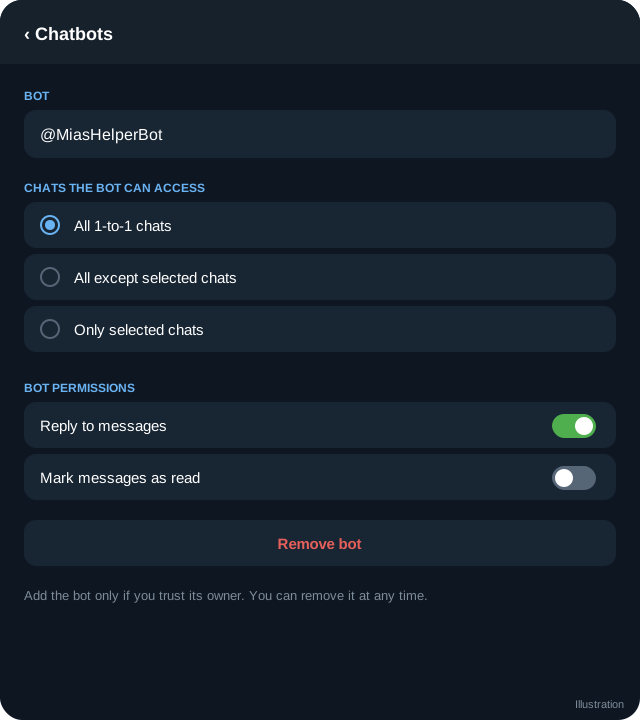
Connecting a chatbot
A chatbot can reply in your private chats on your behalf. The steps in outline:
- The bot must have business mode enabled by whoever created it (in BotFather).
- In Settings, open Telegram Business, then Chatbots, and add the bot's username.
- Choose which chats it covers and review its permissions.
- Test with a second account.
A full walk through is in how to link an AI clone to your Telegram account. For the general idea of how bots read and answer messages, see how chat bots and auto-reply work on Telegram.
A layered approach that feels human
The best setups layer tools from lightest to heaviest:
- Layer 1: greeting and away message. Everyone gets a quick, warm acknowledgement.
- Layer 2: quick replies. You send accurate answers fast when you are online.
- Layer 3: chatbot for a narrow job. The bot handles FAQs or after-hours questions only.
- Layer 4: a human for everything important. Payments, complaints, safety and personal conversations.
Resist the temptation to jump straight to layer 3 for everything. Fans notice when the same phrase arrives instantly at 4 a.m.
Rules and honesty
- Do not use automation to spam people who did not write to you first.
- Do not pretend an automated reply is a person if someone sincerely asks. See AI clone safety and disclosure.
- Telegram can limit accounts that behave like spam. Keep messages relevant and avoid mass copy and paste.
- If you use the account for a business or agency, make sure the people with access are authorised. See telegram for creator agencies.
A first week plan
- Day 1: write the greeting and away message, set hours.
- Day 2: build ten quick replies.
- Day 3: read your last 50 conversations and list the most common questions.
- Day 4 to 5: if one question dominates, consider a chatbot for just that.
- Day 6 to 7: test and review every automated reply for tone.
Frequently asked questions
Does Telegram Business cost money?
Telegram Business features have been offered with Telegram Premium at the time of writing. Pricing and bundling can change, so look in your Settings screen for the current terms.
Can automation send messages to people who have not written to me?
The greeting, away message and chatbot features are for people who message you. Do not use other tools to contact strangers in bulk, because that is spam and can get your account limited.
Will the other person see that a bot replied?
You should assume they cannot tell. That is why honesty in your bio or welcome message matters.
What happens if my chatbot breaks?
Messages arrive in your inbox as normal. You can answer yourself or remove the chatbot in Telegram Business settings.
Related guides

How to Link My AI Clone to My Telegram Account
Step by step: connect your AI clone to your Telegram account with Telegram Business chat automation, what it replies to, its limits and how to stay safe.

How Chat Bots and Auto-Reply Work on Telegram
A clear explanation of Telegram bots: how they receive messages, how auto-reply works, rule-based versus AI bots and where bots can and cannot act.

Telegram Business Accounts Explained
Telegram Business features help professionals and creators manage customer chats. Learn what they are, what they include and how creators can use them.
Telegram Welcome Messages for New Fans: Templates and Rules
Write a Telegram welcome message that feels personal: structure, examples for channels, bots and Business chats, timing and mistakes to avoid.

OnlyFans Telegram Bot Guide: What a Bot Can and Cannot Do
A plain guide to using a Telegram bot alongside an OnlyFans page: welcome flows, auto-reply, payments with Stars and the limits creators should know.

AI Chat Companions on Telegram: What They Are and How to Judge Them
An explainer on AI companions and chat characters on Telegram: how they work, creator clones versus fictional characters, safety, privacy and red flags.
More in Bots, automation and AI
- AI Clone Safety and Disclosure: A Creator Checklist
- Automating Welcome and Follow-Up Messages on Telegram
- How to Create a Telegram Bot with BotFather
- How to Find Good Telegram Bots (and Avoid Bad Ones)
All topics: Bots, automation and AI · Guide index · Explore Telegram · About TSocial