
How to Create a Telegram Bot with BotFather
· 4 min read · 18+ readers

Every  Telegram bot starts the same way: with a chat with BotFather, Telegram's official tool for creating and managing bots. This guide walks through the process for beginners and explains what comes next. You do not need to code to complete the first steps. Telegram updates BotFather occasionally, so menus may look slightly different.
Step 1: Find the real BotFather
Search for @BotFather in Telegram. The real one has a blue verification tick. Scammers create lookalikes, so check the tick and the username spelling before you press Start.
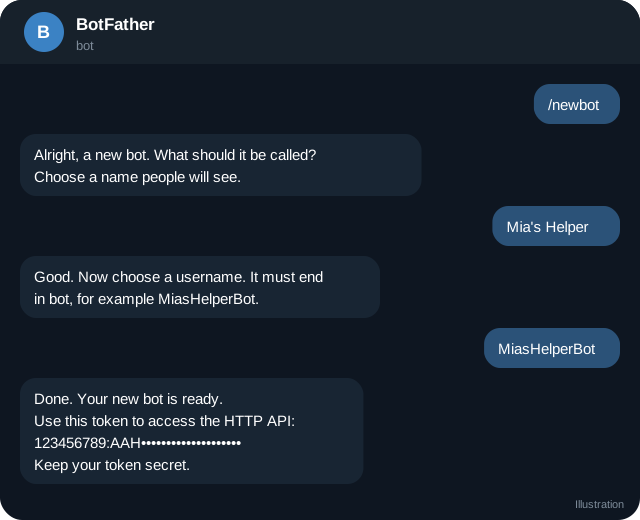
Step 2: Create the bot
- Send
/newbot. - BotFather asks for a name. This is the display name people see, such as "Mia's Helper".
- Then it asks for a username. It must be unique and end in
bot, such asMiasHelperBot. - BotFather replies with a token. This is a long string that works like the bot's password.
Step 3: Keep the token secret
Anyone with the token can control the bot. Do not paste it in public chats, screenshots, code repositories or support requests. If it leaks, send /revoke to BotFather (or use the bot settings) to generate a new token, then update your setup.
Step 4: Set up the profile
In BotFather, use these commands (or the bot settings menu) to polish the bot:
/setdescription: text shown when someone opens the bot for the first time./setabouttext: the short text on the bot's profile./setuserpic: a profile picture./setcommands: the list of commands shown in the chat menu, such asstart - Welcome,links - My links,help - Get help.
Keep the descriptions safe for work and honest about what the bot does. Say that it is a bot.
Step 5: Decide how it will run
A bot needs a program that responds to messages. Your options:
- No-code or hosted bot builder: you configure menus and replies in a web interface. Fast to start.
- A ready-made template: you host it yourself, for example on a small server.
- Custom code: you write the logic with a library for your language (many exist) and the Telegram Bot API.
If you hire someone, you should remain the BotFather owner so that you can change the token and move hosting later.
Step 6: Turn on useful settings
BotFather offers settings that matter for creators:
- Menu button: opens a Mini App or a link. See Mini Apps for creators.
- Privacy mode and group settings: control what the bot sees in groups.
- Payments: the Stars payment feature lets bots charge digital goods. See Stars for creators.
- Business mode: enable it if you want the bot to work through Telegram Business. See linking a clone to your account.
Step 7: Test as a stranger
Open the bot from a different Telegram account. Press Start, try each button and send an unexpected message. Ask a friend to test too. Fix anything confusing.
Step 8: Launch gently
Announce it to a small group first. Watch for issues. Then add it to your link hub, channel description and pinned post. See onboarding flows.
Safety checklist
- Token stored in a password manager, not in plain notes.
- Two-step verification enabled on your Telegram account.
- Bot description clear and honest.
- Data collection minimal and explained.
- A human contact available.
- Updates and backups planned.
Quick checklist
- Real BotFather confirmed by its verification badge.
- Bot name and username chosen carefully.
- Token stored in a password manager.
- Description, about text and picture set.
- Commands registered and tested.
- Hosting method decided before launch.
- Tested from a second account.
- Plan for revoking the token if it leaks.
What to do in your first week
On day one, create the bot and write the start message. On day two, add the three buttons you really need and test them. On day three, ask two friends to use it without instructions and watch where they get stuck. On day four, fix the confusing parts. On day five, write a short privacy note that says what the bot stores. On days six and seven, share it with a small group of followers and collect feedback. A bot that is simple, honest and reliable beats a clever one that breaks.
Frequently asked questions
Is BotFather free?
Creating a bot is free. Hosting and tools may cost money.
Can I change the bot username later?
You can change the display name any time. The username is more restricted, so choose carefully.
What if I lose the token?
Ask BotFather for the token again or revoke and generate a new one.
Can I make a bot without coding?
Yes, using hosted builders. Pick one you trust and check how it handles data.
Related guides
Telegram Bots for Creators: 8 Useful Jobs a Bot Can Do
What a Telegram bot can do for a creator: welcome menus, FAQs, link delivery, polls, giveaways, payments with Stars and moderation, with safety tips.
How Chat Bots and Auto-Reply Work on Telegram
A clear explanation of Telegram bots: how they receive messages, how auto-reply works, rule-based versus AI bots and where bots can and cannot act.
Telegram Bot Commands, Menus and Onboarding Flows
Design a bot that new fans can use in seconds: start message, command list, inline buttons, menus, language, error handling and a human fallback.
Telegram Mini Apps for Creators: What They Can Do
How creators can use Telegram Mini Apps: link pages, shops, member areas, games and tools. Includes launch options, Stars, design and safety tips.
How to Link My AI Clone to My Telegram Account
Step by step: connect your AI clone to your Telegram account with Telegram Business chat automation, what it replies to, its limits and how to stay safe.
AI Chat Companions on Telegram: What They Are and How to Judge Them
An explainer on AI companions and chat characters on Telegram: how they work, creator clones versus fictional characters, safety, privacy and red flags.
More in Bots, automation and AI
- AI Clone Safety and Disclosure: A Creator Checklist
- Automating Welcome and Follow-Up Messages on Telegram
- How to Find Good Telegram Bots (and Avoid Bad Ones)
- Telegram Bot Moderation and Spam Control for Groups
All topics: Bots, automation and AI · Guide index · Explore Telegram · About TSocial