
How to Link My AI Clone to My Telegram Account
· 5 min read · 18+ readers

An AI clone is an assistant that writes replies in your voice, using a description of your personality and style that you provide. Linking it to your  Telegram account means it can answer people who message you, while you stay in control. This guide walks through the connection step by step, explains what the clone replies to, and covers limits and safety. Adults 18+ only, nothing explicit, and no promises about results.
People also search: "How t link my ai clone to my telegram account".
What an AI clone is
A clone is software that uses a language model plus your instructions. You describe who you are, how you talk, what you offer and what you never discuss. When a message arrives, the clone drafts a reply that follows those instructions.
Important points:
- It is not you. It imitates a style and can be wrong.
- It only knows what you give it. If you do not tell it your prices or rules, it will guess, so write them down.
- It can be wrong about facts, so you should review what it says, especially at the start.
For writing the instructions, see how to write a persona prompt for your AI clone.
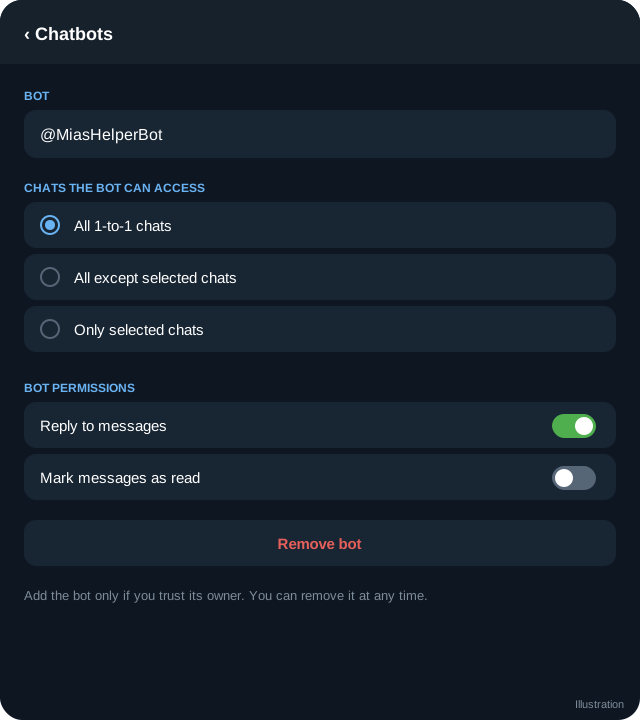
How the link works: Telegram Business
Telegram has a feature called Telegram Business. It lets a chatbot reply to private chats on your personal account, so the messages appear in your normal inbox. The key facts:
- Chatbot connection is part of Telegram Business, which is tied to Telegram Premium on your account. Check the current requirements in Telegram's settings, because plans and features change.
- The bot must be built to support business mode. Whoever runs your clone's bot has to enable it in BotFather.
- You choose which chats the bot can see and reply to, and you can exclude people.
More detail is in Telegram Business chat automation explained.
Step by step
- Get the bot username. Your clone provider gives you the username of the bot that runs your clone. It ends in "bot", for example
@YourCloneBot(a placeholder, not a real account). - Open Telegram settings. On your phone, open Settings, then Telegram Business, then Chatbots. If you do not see Telegram Business, your account may not have Premium or the feature may not be available in your region yet.
- Add the bot. Type or paste the bot username. Telegram checks that the bot supports business mode. If it does not, ask the provider to enable it.
- Choose who the bot talks to. Pick specific chats, all private chats, or all except some. Starting with a small group, or with new contacts only, is a safe way to test.
- Set permissions. Telegram shows what the bot may do, such as reading and replying to messages. Grant only what the clone needs.
- Say hello from another account. Message your own account from a different Telegram account and read the reply. Check tone, facts and anything it should refuse to discuss.
- Watch the first days. Scroll through the conversations regularly. Add rules for anything the clone got wrong.
You can remove the bot at any time in the same settings screen.
What the clone replies to
By default a business chatbot can reply in private chats you allow. Typical uses are:
- Greeting new contacts and telling them what you offer.
- Answering frequent questions about your schedule, links and rules.
- Keeping a conversation warm while you are offline.
- Handing off to you when a topic needs a human.
It does not reply in groups or channels through this feature, and it should not handle payment disputes, safety concerns or personal crises. Write those as "stop and flag it for me" rules.
Limits to expect
- Mistakes. Language models can invent details. Give the clone a short fact sheet and tell it to say "let me check and come back to you" instead of guessing.
- Tone drift. In a long chat the style can slide away from yours. Review samples weekly.
- Delays and outages. If the provider is down, messages simply wait for you. Keep an away message ready.
- Rules of other platforms. If you promote other platforms, read their terms on assistants and automation.
- Cost. Providers charge in different ways. Do not assume the clone will earn back its cost.
Safety checklist
- Be honest. Do not claim that a person typed every message. A short line in your bio or welcome, such as "replies may be assisted by AI", is a good habit. See AI clone safety and disclosure.
- Never share secrets. The clone should not know your passwords, address, ID or banking details.
- Keep minors out. Add a rule to end any conversation where someone says they are under 18, and report it as appropriate.
- Keep a human override. You should be able to open any chat and reply yourself.
- Check the provider. Use a provider you can identify and that does not ask for your login codes. A connection through Telegram Business never needs your Telegram password or login code.
Troubleshooting
- Bot not found in Chatbots: check the username and that business mode is enabled for the bot.
- No replies: the chat may not be in the allowed list, or the provider may be paused.
- Replies sound off: tighten the persona instructions and add examples of good replies.
Frequently asked questions
Do I need Telegram Premium to connect an AI clone?
Chatbot connection sits under Telegram Business, which at the time of writing is offered with Telegram Premium. Telegram changes plans from time to time, so check your own Settings screen.
Can the clone reply in my channel or group?
Not through Telegram Business. It works in private chats you allow. Group moderation uses a different kind of bot, covered in Telegram bot moderation and spam control.
Will people know it is a bot?
Telegram does not label the replies as automated for you, so it is your job to be honest. Many creators add a short note in their bio or welcome message.
Can I take over a conversation?
Yes. You can open the chat and type yourself at any time, and you can remove or pause the bot in Telegram Business settings.
Related guides
Telegram Business Chat Automation: Greeting, Away and Chatbots
How Telegram Business automation works: greeting and away messages, quick replies, business hours and connecting a chatbot to your private chats.
AI Clone Safety and Disclosure: A Creator Checklist
Be honest and safe when an AI assistant replies for you: disclosure wording, data privacy, age checks, escalation rules and what to review each week.
Writing a Persona Prompt for Your AI Clone
How to write clear instructions for an AI clone: voice, facts, boundaries, handoff rules and examples, with a safe template and testing steps.
AI Chat Companions on Telegram: What They Are and How to Judge Them
An explainer on AI companions and chat characters on Telegram: how they work, creator clones versus fictional characters, safety, privacy and red flags.
OnlyFans Telegram Bot Guide: What a Bot Can and Cannot Do
A plain guide to using a Telegram bot alongside an OnlyFans page: welcome flows, auto-reply, payments with Stars and the limits creators should know.
Automating Welcome and Follow-Up Messages on Telegram
Use Telegram's tools and bots to send welcome and follow-up messages without spam: timing, consent, segmentation, opt-outs and a sample sequence.
More in Bots, automation and AI
- How Chat Bots and Auto-Reply Work on Telegram
- How to Create a Telegram Bot with BotFather
- How to Find Good Telegram Bots (and Avoid Bad Ones)
- Telegram Bot Commands, Menus and Onboarding Flows
All topics: Bots, automation and AI · Guide index · Explore Telegram · About TSocial