
Keep Your Telegram Bot Token Safe (and What to Do if It Leaks)
· 4 min read · 18+ readers

The token BotFather gives you is the only thing needed to control your bot. Whoever holds it can read the bot's updates, send messages to everyone who ever used it and change its settings that the API allows. Treat it like a password. This guide covers where tokens leak, how to store them, how to rotate them and what to do if one is exposed.
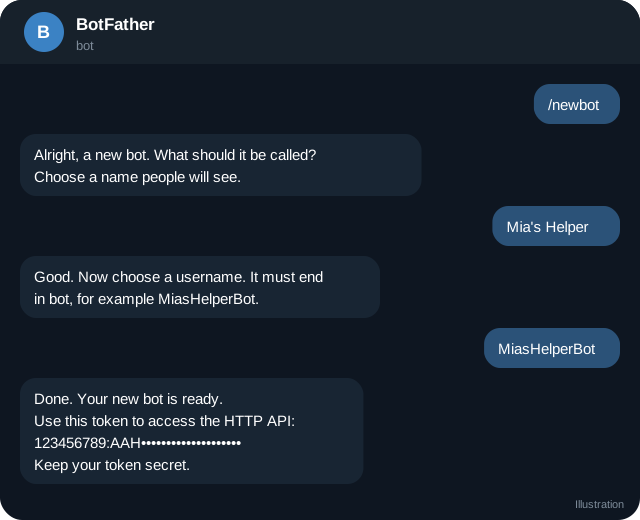
What a token looks like
123456789:AAHxxxxxxxxxxxxxxxxxxxxxxxxxxxxxxxxA number, a colon and a long string. The number is the bot's id, which is public. The part after the colon is the secret.
Where tokens leak
- Source code in public repositories. Automated scanners find tokens within minutes.
- Screenshots and screen sharing of a terminal, an editor or BotFather.
- Chat messages and support tickets where you pasted the token.
- Logs that print request URLs. Remember that Bot API URLs contain the token.
- Front-end code. A Mini App page must never contain the bot token.
- Shared documents and issue trackers.
- Contractors and old team members who still have access.
- Browser extensions or random tools that ask for your token.
Store it properly
- Put it in an environment variable or a secrets manager of your host. Never in source code.
- Keep
.envfiles out of version control by listing them in.gitignore. - Use separate bots for development and production, with separate tokens.
- Limit who can read production secrets, and write down who has them.
- If your platform has a secret store, use it instead of plain environment files.
Example loading in Node:
const token = process.env.BOT_TOKEN;
if (!token) throw new Error("BOT_TOKEN is not set");
Scrub tokens from logs. If you log URLs, replace the token with ***.
Webhook protection is separate
The webhook secret token is a different secret that protects your server from fake updates. Use both. See webhook setup.
Rotate on a schedule and on any doubt
In BotFather, send /revoke, choose the bot and receive a new token. The old one stops working immediately. Update your deployment. Consider doing this when:
- A team member leaves.
- You moved hosting.
- You are unsure whether it was exposed.
- A token appeared in a repository, even briefly.
Plan a short downtime, since the bot will fail until the new token is deployed. With a webhook you may need to run setWebhook again.
Signs of misuse
- Messages you did not send.
- Webhook URL changed. Check
getWebhookInfo. - Unknown commands or description changes.
409 Conflicterrors when polling: someone else may be callinggetUpdates.- Complaints from users about strange messages.
Leak response checklist
- Revoke the token in BotFather immediately.
- Deploy the new token.
- Check
getWebhookInfoand reset the webhook and secret. - Review recent bot activity and logs.
- Find the source of the leak and remove it: delete the commit history if needed, rotate other secrets that were in the same place.
- Warn users if messages were sent in your bot's name. Be honest and brief.
- Add a scanner or a pre-commit check to prevent a repeat.
Removing a secret from a public repository does not make it safe again. Assume it was copied.
Team and vendor practice
- Give vendors a development bot, not the production one.
- If a vendor must run your bot, be the owner in BotFather so that you can revoke access. See what to ask a vendor.
- Never share your own
 Telegram login code or two-step password. A bot token is not your account password, but your account owns the bot.
- Use two-step verification on your Telegram account, since the account controls BotFather.
Quick checklist
- Token stored in a secret manager or environment variable.
- .env files ignored by version control.
- Separate bots for development and production.
- Logs scrub URLs that contain the token.
- Token never appears in front end code or screenshots.
- /revoke practised so the team knows the steps.
- Webhook secret kept separate from the token.
- Access reviewed whenever a team member leaves.
Automate detection
Add a secret scanner to your repository and to your continuous integration, so that a token pasted into code is caught before it is public. Many hosting providers and code platforms also scan for leaked tokens. Treat any alert as a real leak and rotate the token at once.
Frequently asked questions
Is the bot id secret?
No. The number before the colon is public.
Can I check who used my token?
Telegram does not provide a usage log. Watch your own logs and bot behaviour.
Does revoking break my users' chats?
No. Chats continue. Only the old token stops working.
Can I put the token in a Mini App?
No. Mini Apps run in the user's browser. Keep the token on your server.
Related guides
BotFather Commands: What Each One Does
A reference to BotFather, Telegram's tool for creating and managing bots: the main commands, settings menus, what they change and what to watch out for.
Set Up a Telegram Webhook with HTTPS and a Secret Token
Register a webhook with setWebhook, protect it with secret_token, check getWebhookInfo, pick allowed_updates and handle retries, with a short Node example.
Create a Telegram Bot Step by Step (With a Working Reply)
From zero to a bot that answers /start: make it in BotFather, test the token with getMe, send your first message and choose polling or a webhook.
Host a Telegram Bot Cheaply: Options and Trade-offs
Where to run a Telegram bot for little money: your own computer, a small server, serverless functions and container platforms, with reliability and security tips.
Spotting Scams and Impersonators on Telegram
Common Telegram scams aimed at creators and fans: fake support, impersonators, fake giveaways, crypto traps, phishing and how to respond.
A Telegram Webhook on AWS Lambda or a Small Server
Two ways to receive Telegram updates: an AWS Lambda function URL and a tiny Node server behind HTTPS, with secret token checks, fast replies and queues.
More in Build on Telegram
- Add a Bot as Channel Admin and Post to Your Channel
- Bot Privacy Mode and Group Admin Rights Explained
- Common Telegram Bot Errors and How to Fix Them
- Connect a Bot to Your Telegram Business Account (Chatbot Mode)
All topics: Build on Telegram · Guide index · Explore Telegram · About TSocial