
Telegram Link in Bio Tools Compared: Linktree, TSocial and More
· 4 min read · 18+ readers

A link in bio tool is the front door of a creator's social profile. For  Telegram creators the questions are specific: does it open my chat cleanly, can strangers find me, what does it cost and what are the rules? This guide groups the tools you will meet and gives you a way to test them. We make
 TSocial, one of the tools mentioned, so we are not neutral. We describe the others only in general terms and from what their public pages said on 6 November 2026. For details and prices, go to each site.
Three kinds of tools
- General link pages. Services such as
 Linktree that work for any platform, with themes, analytics and paid levels. See TSocial vs Linktree.
- Telegram-first creator pages. Pages built around a chat button, a channel and Telegram features, such as TSocial profile pages.
- Creator monetisation platforms. Services such as
 Telescope and
 TLINK.ME that, from their public descriptions, focus on live interaction or paid conversations rather than simple links. See Telescope vs TLINK.ME.
They overlap but are not the same job.
An example grid
| Tool | Kind | What its public page says (6 Nov 2026) | Check yourself |
|---|---|---|---|
| Linktree | General link page | Not fetched for this guide | Plans, features, rules |
| TSocial | Telegram-first page and directory | Our own product | Current Stars price in the app |
| Telescope | Live platform | Live streaming, chat, gifts, VIP perks, video calls, 18+ | Fees and terms |
| TLINK.ME | Monetisation tool | Monetise DMs and exclusive content, analytics | Fees and terms |
What to compare
- Telegram handling: does the main button open a chat or channel directly? Test on iPhone, Android and desktop.
- Speed: does the page load fast on mobile data?
- Discovery: will anyone find you outside your own bio link? A directory or a feed can help.
- Price model: monthly plan, one-time payment, revenue share or free. Compare over a year using today's numbers.
- Rules: content policy, age rules and what happens on a violation.
- Analytics: clicks per link and per source.
- Ownership and exit: can you use your own domain and export your data?
- Support: is there a person to contact?
TSocial's honest strengths and limits
Strengths: free to join and list in a directory of Telegram creators, channels, groups, bots and Mini Apps; a Telegram-first profile with a chat button; a link builder paid once in Stars (99 at the time of writing); Stars ads; free shoutout swaps; a large library of guides. Limits: it is newer, it is not a live platform, and some features are still rolling out. See about TSocial.
A 30 minute test
- Make a test page in each tool you are considering.
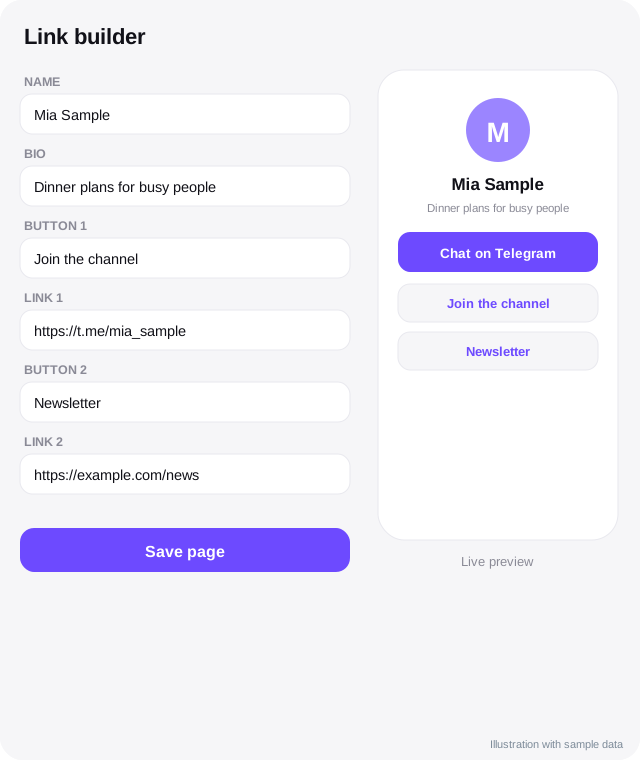
- Add the same three links: chat, channel, newsletter.
- Open each page on a phone through
 Instagram or
 TikTok's in-app browser.
- Time how long it takes to reach the Telegram chat.
- Check what an anonymous visitor sees and whether anything looks off.
- Read the pricing and terms pages for the real cost.
- Pick one, publish it and measure clicks for two weeks.
Mistakes to avoid
- Choosing by design alone.
- Ignoring content rules until a page is removed.
- Locking yourself in with no export.
- Adding ten links when two matter.
- Forgetting to update links when your channel changes.
More ideas in link in bio tools for Telegram creators and bios and pinned posts.
Quick checklist
- Main Telegram button above the fold.
- Two or three links at most.
- Tested on iPhone, Android and desktop.
- Unique tag per social platform.
- Pricing compared over a year.
- Content rules read.
- Export or own domain available.
- Review monthly.
Keep it simple
The best link page is the one your followers actually use. If a visitor cannot find the Telegram button in two seconds, change the page, not the audience. Use plain words on the buttons, such as "Chat on Telegram" and "Join the channel".
What we left out on purpose
We did not rank the tools or declare a winner, because a ranking would need current prices, tested features and your own goals. We also did not describe features we could not see on public pages. If you want a tool added to this list, or a fact corrected, tell us through the contact page and we will check it against the tool's own site before changing anything.
Frequently asked questions
Which tool is best?
It depends on your goal. A simple page for Telegram links, a general page for many platforms or a monetisation platform are different choices.
Can I use more than one?
Yes. Use unique tags so you can see which one brings clicks.
Do I need to pay?
Many offer free levels. Check what you need and what it costs on each site.
Where can I get a free listing?
TSocial's Explore directory is free to list.
Related guides
Link in Bio Tools for Telegram Creators
What a link in bio page is, what to put on it, how to choose between tools, track clicks and keep your Telegram link front and centre.
TSocial vs Linktree for Telegram Creators
A fair comparison of a general link in bio service and a Telegram-first creator profile: audience, Telegram features, discovery, pricing approach and fit.
TSocial vs Telescope for Telegram Creators: An Honest Comparison
A fair look at TSocial and Telescope: what each says it does on its public pages, where they differ, what we could not verify and who each suits.
TSocial vs TLINK.ME for Telegram Creators: A Fair Comparison
How TSocial and TLINK.ME differ, based on TLINK.ME's own public site on 6 November 2026, with what we could not verify and who each tool suits.
Bios and Pinned Posts That Turn Visitors into Followers
Write a Telegram bio, channel description and pinned post that explain who you are, what people get and what to do next, with examples and checks.
Best Telescope Alternatives for Telegram Creators
Options to consider alongside or instead of Telescope: link pages, directories, memberships, community tools and Telegram's own features, with fair caveats.
More in Link tools compared
- Best TLINK.ME Alternatives for Telegram Creators
- Telescope and TLINK.ME Pricing and Features Explained: What Is Public
- Telescope vs TLINK.ME Compared (From Their Public Pages)
All topics: Link tools compared · Guide index · Explore Telegram · About TSocial